


Latest articles
Your guide to the PhotoDay world. Tips, tricks, industry news, and more can all be found right here.

Create the Perfect Sparkler Photos
In need of some tips and tricks for those awesome 4th of July sparkler photos?

No problem, we've got you covered. Whether you've been hired to shoot a 4th of July event - or you're planning to take photos of your kids and their friends, these tips from our team photographer will come in handy. Before we get started though, we need to let you in on a little secret... all sparklers are not created equal. This is important depending on the type of photo you are looking for. The longer the sparkler, the longer you can attempt at capturing. Makes sense right? Sparklers range from 20 seconds - 120 seconds, longer ones being best for light trails. Now, let's continue.
Let's talk about camera settings.
First up, nail that exposure triangle!
- Shutter Speed: This all depends on what kind of sparkler photo you are trying to achieve. If you are looking to freeze the action, then bump up that shutter speed over 1/250. Digging the light trails look instead? Then slow down your shutter speed. Keep in mind that anything lower than 1/60 is going be hard to handhold with a sharp subject focus and without a flash to freeze the action.
- ISO: If you want more ambient background colors, choose a lower ISO so that you can have a wider dynamic range. Need more light? Push up your ISO so that you can get a properly exposed photo. But be careful, if you push your ISO too far then that pesky digital noise starts to creep up on you.
- Aperture: Lower apertures are going to allow for more light to come through the lens and create the most bokeh, f1.8 - 2.2 being ideal. If you would like to have a wider depth of field, then push the aperture up to f8.
Can we talk about using the camera with flash a little bit more? Absolutely!
- Use an external flash: You are going to want to bounce the flash off to the side or point the flash straight up. Remember, this is to freeze the action, not fill the photo with light.
- Set your flash to rear curtain sync: That means the shutter on your camera will close at the end of a long exposure image.
- Lastly, set the right exposure and make some memories!

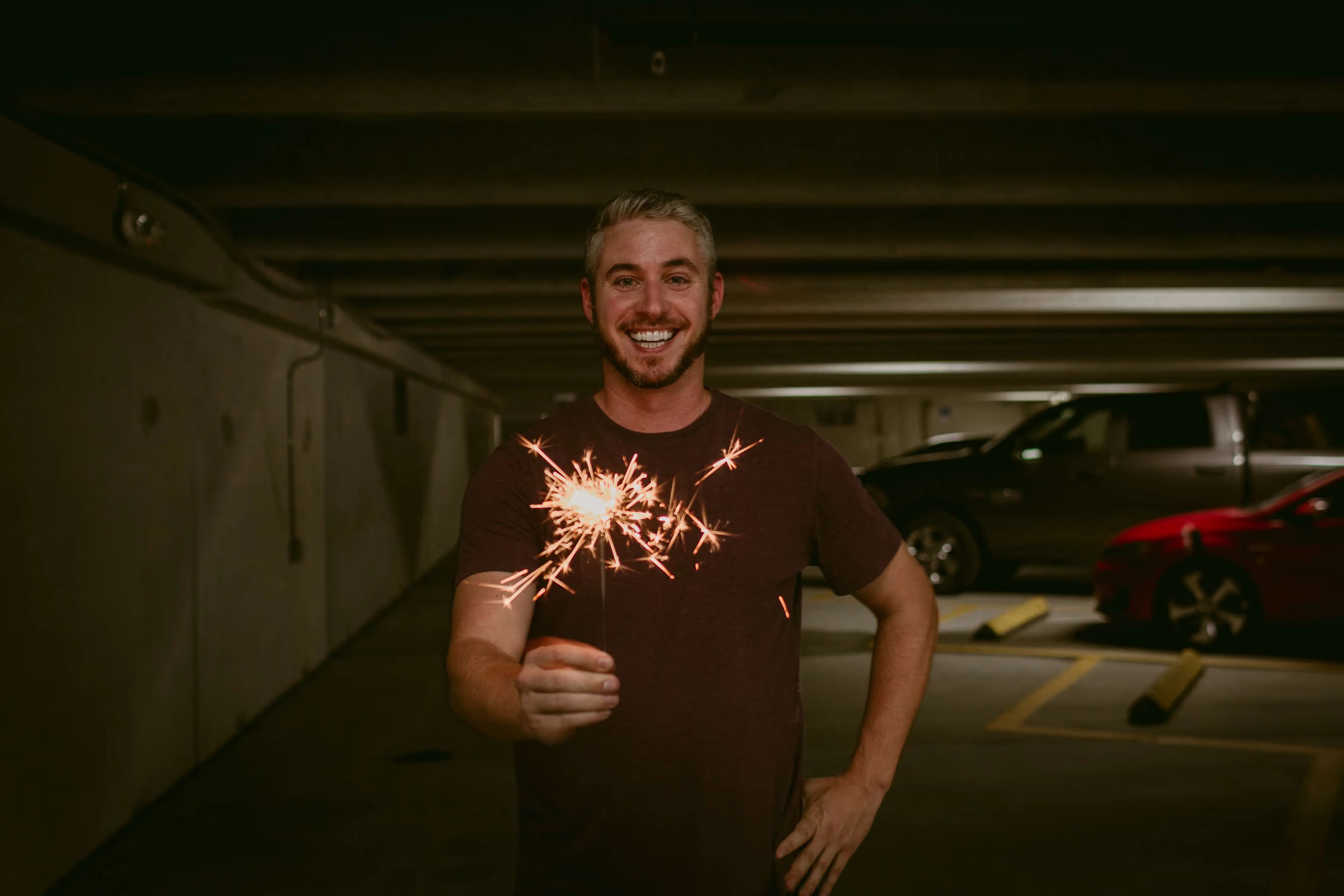
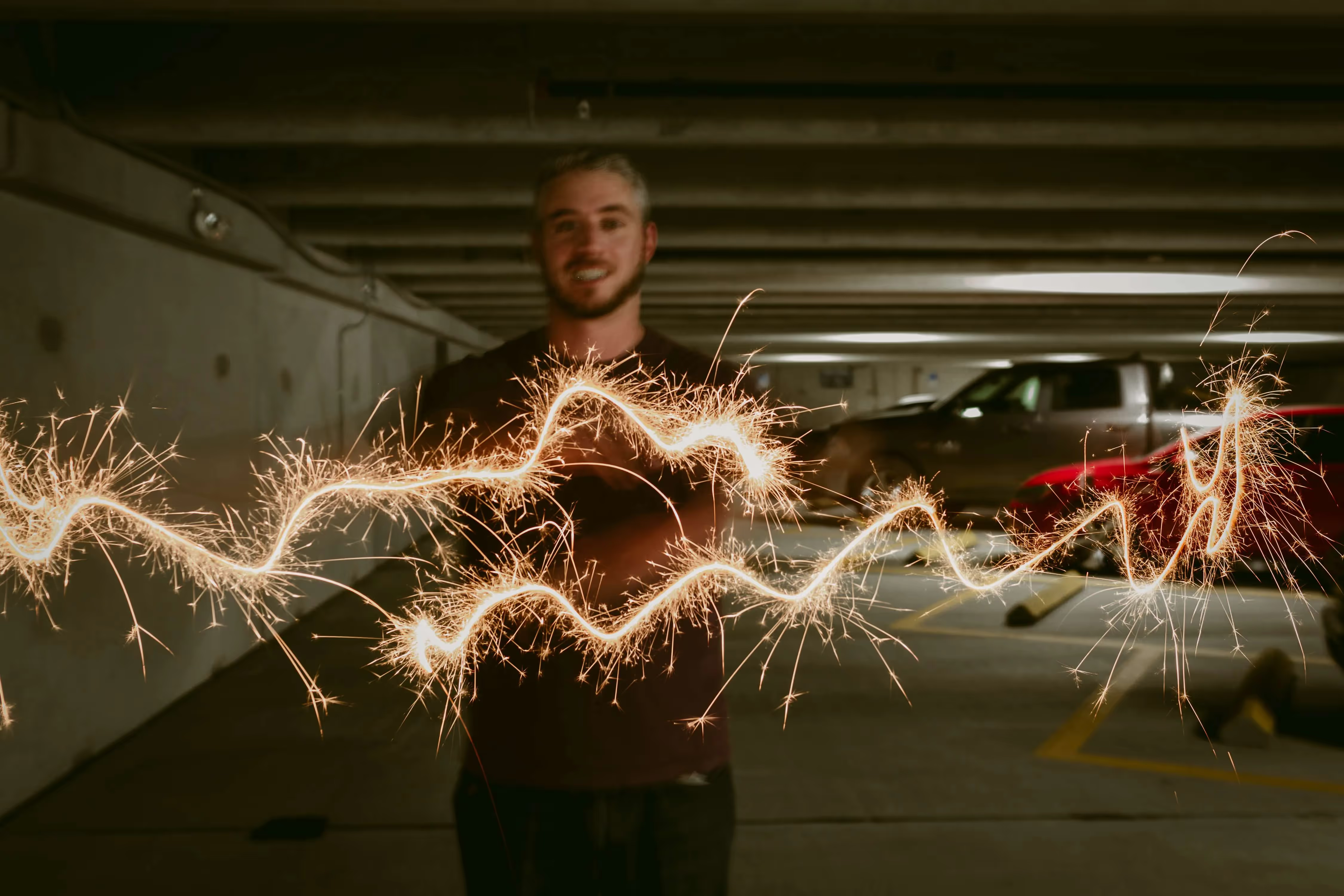
Take Great Sparkler Photos with Your Phone
Battery died and forgot to bring backup? At a party but didn't bring your camera? NO PROBLEM. Take that thing out of your pocket and put it to some use! Phones can capture a decent photo when all else fails.
- Use burst mode on your phone: To do this, hold down the shutter button. This is going to take many photos in succession so that you can get that one clear shot. Plus, why not? The images are digital and free.
- No flash for the phone: Unless you are into those images that come out fully white, you are going to want to turn that sucker off. Phone flashes tend to be a bit too much for closer sparkler candids.
- Underexpose the image: Don't worry, you can always pull up the image in post production. Besides, you don’t want to overexpose the very thing that you are featuring.
Can't wait to see all the sparkler photos this week! I'm sure you all will be taking some amazing ones for Fourth of July. Post some on Instagram, hashtag #PDsparkler so we can see them too!Have a great holiday!
Please keep in mind that sparkler photos are best done outside to minimize the risk of objects catching fire.

Happy National Camera Day!
Today is the day that we celebrate cameras and how far they have come. With the advancement of technology, cameras have become more affordable and easy for the everyday person to use. That being said, photographers have to find ways to stand out in the crowd by showing their creativity and skillset in every image. So, out of curiosity, we asked members from our team, whether or not they were photographers, what was important to them in a photo. Based off the responses, we came up with some recommendations for a photographer to achieve these goals. What do you think? What are some equipment that you would recommend?
"Composition and lighting. Both are important to me for making a photo look better, more interesting, and engaging."
Recommendation: Lightroom Mobile
Lightroom Mobile is a free and powerful app for editing your photos. Use its tools to create compositions that elevate the photo. make sure to keep these 5 basic compositional theories in mind: Symmetry, Rule of thirds, Triangle and Geometry, Negative Space, and Leading Lines.
"If it's a portrait image, then it should be well lit and have a compelling background that helps tell the story."
Recommendation: Nifty 50! Canon EF 50mm f/1.8 STM Lens
The low aperture on this lens is great for capturing moments in low lighting and for creating a beautiful bokeh background. The best part? It has a low price tag of $100!
"I'd be more drawn into an action shot, meaning the subject is in action...running, throwing, kicking - where there is raw emotion."
Recommendation: AI Servo With Action Shots
Use AI Servo in conjunction with Single Point AF to get the sharp focus you need with action shots. Select a single AF-point that is in the general vicinity of your action while still shooting in Continuous Servo AF. If you aren’t sure exactly where you want to want to be focusing, choose an area option because it will give you a little bit more leeway to get the focus.
"Expression. Some of my children's school or dance photographs are perfectly lit, with a great background and posing, but their expression is awful. They look surprised and sometimes frightened- as if the photographer was making a loud noise or maybe said something strange. The saying 'A picture is worth a thousand words' applies here. Ha!"
Recommendation: The SanDisk 64GB Extreme PRO UHS-I SDXC Memory Card
Take many photos to get the right expression when using this memory card. It has minimum write speeds of 30 MB/s, read speeds up to 170 MB/s, and you can store up to 64GB of photos.
"For me in particular, I enjoy photos that capture the emotion of the experience which involves more candid photos with genuine expressions and interactions."
Recommendation: Roberto Valenzuela’s “Three-Point Check” System
This system helps pose subjects with purpose by directing the subject’s awareness of the camera. The look and feel of an image will depend if the eyes, chin/nose, and/or collarbone/chest are directly facing the camera. For example, if we turn all three away from the camera and direct the subject to smile laugh, the image will appear to be more candid.
"Color Grading"
Recommendation: Understand White Balance And Color Temperature
Tip 1: Color Temperature is simply the color of the light source
Tip 2: Different Types Of Lights May Give Off Different TintsColor Temperature deals with oranges and blues, but your light source may also exude different tints of color such as green or magenta. So when you’re shooting you may have to either change your camera’s setting to compensate, or if you’re shooting in RAW you can correct the tint in your photo editor.
Tip 3: Set Your Camera’s White BalanceWhen you set your camera’s White Balance you can choose one of the pre-sets (Sunny, Cloudy, Tungsten, etc…), or if you’re using a more advanced camera you can dial in your White Balance manually using Color Temperature. You can also choose AWB.
Tip 4: Use Live View To Dial In Your White BalanceIf you’re using a DSLR then using Live View to dial in your White Balance is great because you can see the adjustments in real time. If you’re using a Mirrorless Camera or a camera with an Electronic Viewfinder then you can do this in the viewfinder. By using Live View you’re able to set your White Balance accurately without having to do the “shoot and check” method.
Tip 5: Shoot In RAW For More Latitude When Adjusting Color Temperature And Tint During Post-ProductionWhen you shoot in RAW your images will retain the most color information, giving you more flexibility when you want to adjust Color Temperature and Tint later.

Ready. Set. Upload!
Lots of PhotoDay users tell us that uploading photos is their favorite step because it means the job is DONE and sales can start rolling in! So we wanted to make the upload process smoother, faster, and more reliable than ever. We listened to our users' feedback and came up with a shiny new upload feature that's gonna blow you away!
What's up with uploads?
We're pretty pumped about this new feature. Here's why:
- Sequential uploading - Each photo gets uploaded one after the other. This greatly improves stability and allows us to show the upload's status.
- Save as you go - Every photo gets saved as it uploads. If you lose internet connection, no problem! We'll save all your photos up to that point. For any photos that didn't make it, we'll flag them so you can try uploading them again by clicking the retry button.
- No more zip files - Simply drag and drop your folders and photos just as they are. Save a step - no need to zip 'em up.
- Sweet tagging - Folder names and Lightroom keywords automatically become your customer-facing tags. So easy!!!
- Background uploads - Photos upload in the background so you can multi-task to your heart's content and work on other things in your Studio Panel.
- Duplicate photos - Sometimes you upload two photos with the same name. No worries, it happens! Now, you can easily replace or skip any duplicates.
- Status check - Monitor the status of your upload.
6 upload facts
If you're getting ready to upload, here are six things you need to know:
- You can drag and drop a combination of folders or individual photos.
- Photos should be in a JPG file format and no greater than 15MB per photo.
- If a photo is in one folder or multiple folders, the folder name(s) will automatically become that photo's tag(s). Curious about tags?
- If a photo has Lightroom keywords, the keywords will also become that photo's tags.
- There is a 31-character limit on file names.
- If you attempt to upload a file with special characters like```< > : " \ / ? | * ~``` we will strip them out and still accept the file.
Well, there you have it - PhotoDay's new upload functionality was designed to give studios a smooth, reliable, and efficient uploading experience. We can't wait to hear what you think. Share your thoughts in the PhotoDay Facebook Users Group. Happy uploading!

Survey Says: Online is Here to Stay
Want to know what your fellow photographers are up to? This past spring, we conducted a broad industry survey of volume sports, school, and event photographers across the nation. We learned that our industry with its changing demographics and sentiment has reached a tipping point as more photographers are ready to tear up paper order forms and take their businesses online.
ONLINE IS HERE
Our survey showed that 84% of respondents were using an online gallery service for some or all of their spring 2019 jobs, and 42% said they were using an online gallery service for the “vast majority” of their jobs.
We also learned that 64% say they’re planning to take business online in 2019 - 28.7% are planning to go 100% online, while 36.2% are seriously experimenting with it this year.


NOT JUST FOR NEWBIES
When asked about their hopes for taking business online in 2019, 72% of studios in business under 5 years said they were doing it or seriously experimenting with it compared to 57% of studios in business for 10+ years said the same. That said, a vast majority - 86.5% of photographers in business under 5 years - were using online galleries for some or all of their spring jobs. But this number was only slightly lower for photographers in business for 10+ years, at 82%.
GENDER MATTERS...
While the respondents were pretty evenly split between men and women, the study showed that more women are starting out in the industry. Women represented 60% of respondents who have been in business for under 5 years, compared to only 33% who have been in business for over 10 years.
Men and women share similar sentiments about going online, with women seeming to be a bit more ready to jump in. 70% of women said that they were planning to take their businesses 100% online or seriously experiment with it in 2019, compared to 58% of men.


...AGE DOESN’T
If we look at age, only 20% of photographers age 55 and over said they were not doing any online sales this spring. That’s not too different from the 17% of photographers under the age of 34 who were not doing any online sales this spring. Age doesn’t seem to be a big factor anymore as everyone seems to have entered the digital age. Respondents age 45-54 make up the largest demographic (35%) who plan to test online gallery services this year.
WHO RESPONDED?
We surveyed 310 volume photographers. Here’s what we know about them:
- 82% indicated that they plan to photograph more than one type of event this year.
- Almost evenly spread between men and women (45% male, 41% female, 4% not identified).
- Ages range from 18 to over 65. Nearly half were between the ages of 45 and 64 (48%).
The event types ranged:
- 65% youth sports / 52% high school sports
- 40% dance schools / karate schools
- 29% preschools
- 55% senior portraits
- 32% public schools
- 25% private schools
- 42% events (both public and private)
The annual number of subjects captured by photographer:
- 64% between 1,000 - 5,000 subjects
- 12% over 20,000+ subjects
Experience levels in business:
- 12% 1-2 years
- 18% 3-5 years
- 15% 6-10 years
- 16% 11-20 years
- 26% 20+ years
While this survey was conducted by PhotoDay, it’s important to note that only 18% of respondents were PhotoDay users.
Taking business online can mean significant time and cost savings for photographers, as well as higher sales and profits. However, we know from experience that just uploading photographs to an online gallery and hoping to see these benefits isn’t the best strategy. Photographers who are finding the greatest sales success and workflow efficiencies know that an online platform requires a new approach to sales and marketing. For tips to help make the transition a smooth one, check out 5 Ways to Take Your Business Online without Risking Sales.
Are you one of the 84% ready to take your business online? Then, you should check out PhotoDay – it’s free to get started. Our team can help you put in place an online strategy that works for your unique business. Contact us here.

Better Together
It's no secret. Every parent has a high-powered camera in hand or in a nearby pocket. You'd be hard-pressed to find a youth sports or school photographer who hasn't considered how camera technology and accessibility has affected their business and our industry. But, this week, at Sync Sports 2019, NO ONE is talking about this. It's old news. The conversations on the tradeshow floor and in the classrooms are forward-looking, centered on innovation and collaboration. The energy is super positive and proactive. Here are our just a few of our top takeaways...
Uniquely Better
Sync Sports 2019 kicked off with show organizer Darty Hines challenging us to look at ways to be uniquely better. With this one simple phrase, he set the tone for the entire conference. I should be clear - he wasn't talking about one-upping your competitor. He was encouraging everyone to consider the possibilities of doing things differently, in a way that will wow and delight customers. Just awesome!
Win-Win-Win
Our industry depends on studios, labs, and technology all working together to deliver an amazing experience for customers. This isn't a zero-sum game - every piece has to work in harmony for all of us to win. When we share ideas, from our unique perspectives, we come up with lasting solutions, not quick hits. Nothing beats bringing people together face-to-face in a setting that encourages learning and conversation. One thing that stands out about our industry is this sense of cooperation that exists, even between competitors. This is certainly on display at Sync Sports - and it's alive and well every day in our Facebook Users Group.
New Realities
As Tim MacDonald of Image Art Studio pointed out in his session, "today's parents don't want to buy the idea of a photo, they want to buy the photo itself." Consumers are accustomed to having ALL the information before they make a purchase of any product. They read reviews, watch videos, look at pictures from a dozen different angles. No one wants to buy the idea of anything when they don't have to. Tim was careful to weigh the pros and cons of moving from a prepay model to an online proof model. Like anything, it's important to have a strategy to test the waters and see what works with an eye on giving customers what they want - which is great-looking photos and a convenient shopping experience. Certainly, in an online proof model, the quality of the photo matters more than ever, which brings me to the next point...
Photo Focus
Jay Boatwright of SMAX Photography has set the gold standard for image quality. In his session today, he took his audience outside to demonstrate how he gets the pose, the expression, the lighting, and the background just right so that he can capture his signature artistic style photos with speed and agility. Making time to hone your skills and improve your craft has always been important in our industry - but now it's essential.
That's just some of the highlights! We'd love to hear your impressions too - join the conversation on Facebook.

PhotoDay Galleries Just Got a Power-Up
Filling out forms, long wait times...this isn’t the DMV, it’s picture day!!! It should be fun, fast, and easy for parents to view and purchase their child’s photos. For the past year, we've been making steady improvements to the PhotoDay gallery experience. But, today is no ordinary day. We just released a dramatically transformed gallery, making everything from searching for photos to customizing products to checking out, more intuitive and faster than ever. We've done our homework, and every change we've made was designed with your customer in mind. Our (not so) secret motive? A smoother experience for your customers means more sales for you!
Here's what you can expect from the new PhotoDay gallery experience:
NEW & IMPROVED SEARCH
The search "modal" - the blue pop-up window where customers choose their search method - has been refined so that they complete their search before the gallery window opens. And, as mentioned in our version 1.25 release, PhotoDay users now have total search freedom which means you can choose which of the three search methods you want to use for a particular job.
PRETTIER GALLERIES
Like we always say, IMAGE IS EVERYTHING! So, we've stripped away any excess clutter in the photo galleries - so that your photos take center stage, and customers can browse them without any distraction.

ON-THE-GO CUSTOMIZATION
This is HANDS DOWN the most exciting update of all! Now customers can customize products while they shop. For Memory Mates and other highly customizable products, we've given them an all-in-one experience that anticipates their next move. They can now crop and swap photos, choose themes, and add text in just a few simple clicks. By the time they get to their shopping cart, all they have to do is pay and checkout! We expect to see even more orders and higher order values now that we've made it SO INSANELY EASY!!!
CLEANER CARTS
With all that product customization behind them, the shopping cart is super clean...so they can easily preview their items and complete their order. Hey, maybe this cleaner shopping cart will make them want to fill it even more.
Check out the all-new PhotoDay for yourself! Text access code PD100 to 90738 for the full experience. When you're done, stop by our Facebook User Group to let us know what you think. If your customers need help, we've got your back. Check out: How to PhotoDay and How do I order my photos?
Here's the deal...you keep taking great photos and we'll keep making improvements to PhotoDay. And, together we'll take your business to new heights!

4 Things Parents Want Their Child’s Photographer to Know
Ever wonder what would make your customers not just satisfied...but happy, really happy?
We did too, so we did a little sleuthing. After customers place orders on PhotoDay, we invite them to take a survey, and many have taken us up on this invitation. Here’s what they want their photographer to know:
1. Please don't make the watermark cover the majority of the subject’s face! You can adjust the watermark position and opacity in your PhotoDay Studio Panel.
What parents have to say:
“I understand the need to watermark the pics until purchase but the watermark should not cover the face to the extent of not being able to see my kid's face. This made it difficult to see which pics I really liked and this affects your selling of the pictures if we can't see which one we want to purchase because we can't see their faces.”
“Your stamp was right over my child’s face, making it difficult to see it. As a result, I ended up purchasing a bad photo...not happy at all seeing as I paid almost $100 for my photos. Maybe think about moving the stamp to a photo corner.”
2. Use free shipping offers, because EVERYONE expects free shipping nowadays - even if it means building the shipping costs into your pricing. Read more about offers.
What parents have to say:
“The ease of ordering was great. However, the shipping cost was a bit high. I would suggest having a deadline for ordering then shipping the order to the school/coach in bulk to save on shipping costs.
“I did not like that there were shipping costs.”
3. Include digital downloads as a sweetener in your packages and add them as an a la carte product. This allows customers to save photos forever and have them printed on just about anything!
What a parent has to say:
“I loved being able to purchase a digital download that I can print at a later time.”
“Thanks for offering a digital download. I can’t wait to print up some photo gifts for our whole family.”
4. Quality matters!!!! Remember to check every picture you are taking and editing and ask yourself, would I want this photo? If you're ready to step up your photography game, be sure to watch the replay of Jay Boatwright's info-packed webinar: Art Quality Photography for Volume Photographers
What parents have to say:
“The background was terrible, the team photo was totally out of proportion and my daughter covered up the team name in the picture. I have not received the pictures but hoping the issues are fixed once received. I really liked the online ordering experience!”
“Photographs are dark. Not happy.”
“Try to make the edit look more natural.”
“The photoshopping on the team photo is absolutely AWFUL. The biggest kid on the team looks like a shrimp, the smallest kids look huge and one kid has a beetle juice head. There has got to be a better job done in the future. The pic is literally comical.”
“The group picture was mis-proportioned. My daughter was almost as big as the coach.”

We're Live with 1.25
Talk to our CEO, Jon, and he'll tell you that one of things that motivates the PhotoDay team is our insatiable desire to give photographers tools to make their lives easier and their sales greater. Technology has the power to make this possible. The latest release of PhotoDay - version 1.25 - is proof.
This release focuses heavily on the end-customer experience because we think picture day should be modern, fresh, convenient, and easy for today’s parents. And, we know that when customers have an awesome experience, photographers get more sales!!! Every feature outlined below is designed to make the customer's experience more personalized, faster to navigate, and easier to checkout.
We based many of these features on feedback from photographers and their customers as well as some slick behind-the-scenes software that lets us record the customer experience. We can see how customers are interacting with the PhotoDay gallery and shopping cart - and identify where things are going smoothly and where there may be some hesitation or confusion.
Here's what you can expect from this latest version of PhotoDay:
Search Freedom
If you're familiar with PhotoDay you know that there are three ways for customers to find their photos:

- FaceFind - Our facial recognition technology filters gallery photos based on a matched reference image. See FaceFind in action
- Tags - Tags are a way to group and organize images in ways that narrows the search in a way that is intuitive to the customer - by team name, coach name, age group, etc.
- All Photos - This view is for customers who want to browse an entire gallery.
Until now, all of these options were presented to every customer for every gallery. With this latest release, photographers have the freedom to choose any combination of these search options to use for a particular job. Cool, right? This feature can be applied in a bunch of use cases:
- By selecting only FaceFind, customers will be limited to seeing photos that contain the matches with a reference photo. This is great for large jobs or any job where privacy is a priority.
- By choosing the Tags option, customers will be able to narrow their search based on grouping criteria set by the photographer. Tags are great for leagues with multiple teams, dance schools with multiple classes, preschools with multiple teachers, etc.
- With All Photos, customers will be able to view, you guessed it, all of the photos in a gallery. This is great for smaller jobs and private events where individuals know one another and want to check out all of the photos.
This new search feature really puts the photographer in the driver's seat - allowing them to mix and match these search types based on the needs of each job. As always, we're so excited to see how this flexibility gets applied in the real world!!! To change search settings for a job, simply go to the Job Settings "General" page and check off the options. Be sure to hit SAVE when you're done.
Better Shopping Experience

Next up is the customer's shopping experience. We are constantly working on the customer side of PhotoDay - the web gallery, the apps, the checkout. We won't quit until shopping is lightning fast and 100% intuitive. Here are the storefront highlights from this release:
- Featured Products & Popular Products - The power of suggestion is STRONG in the online shopping world. How many times does something catch your eye that you weren't even looking for? That's why we've implemented two new sections to the storefront. First is Featured Products - photographers can select products to feature for each price sheet by simply "starring" that product. Second is Popular Products - these are products that we know to be best-sellers for the lab, using actual sales data. This is a huge enhancement that we think will help customers see more of what we all want them to see!
- Improved Layout - Image is everything when selling photos online. That's exactly why we've made some design updates to the online and mobile web galleries - making the photographs more prominent while eliminating any clutter that might get in the way.
- Smarter Buttons - We noticed that some users were accidentally pressing buttons twice which could potentially mean TWO orders. So, we fixed our buttons to prevent that from ever happening again!
Job-Specific Offers
Until now, offers and their corresponding coupon codes were universal, meaning that they didn't tie to any specific job. With this release, you can now associate an offer with a specific job. Why is this awesome? Well, first it allows for your marketing to be more targeted - (like when you create a flyer, you can easily pull in the offer that is tied to the job).
The second reason is even more exciting!!! It's related to a new feature that we're working on that is going to seriously TRANSFORM the way studios interact with customers. With this new feature, we're essentially giving photographers the ability to target and customize text marketing to their customers - to help drive sales, to run special offers, send reminders, and more! We'll have lots more to share on this feature VERY soon - but if you want to see a preview, I encourage you to check out this webinar replay: Kick-A$$ Marketing in an Online World
Number of Subjects
This feature may appear small - but it has GREAT POWER! When you set up a new job, you can add the estimated number of subjects. Why is this a good thing to do? Simply put, it will help with your marketing! If leading up to picture day the opt-ins for the job are only 10% of the estimated number of subjects, you've got some work to do to get the word out to parents about picture day.
And, there you have it! Version 1.25 in the books. If you're a total PhotoDay nerd, you can track the details of every feature update and fix right here.
Not already a PhotoDay user? What are you waiting for? Get started!

5 Ways to Take Your Business Online without Risking Sales
Most sports photographers we meet say they want to take their businesses online. In fact, we just conducted a broad industry survey (not just PhotoDay users!) and learned that 60% of photographers plan to use an online service on some or most of their jobs, and 25% plan to test an online service this spring season. Those are HUGE numbers - and indicators that our industry is finally moving online in a big way. At the same time, we know that there are very real concerns about the risks of changing up the way you've always done business. This list will help you make a smooth transition to a way more efficient workflow that doesn't just mitigate the risks but actually helps you compete effectively in your market and GROW your business.
#1 Choose the right organization
You have to start somewhere, right? So, it's best to look at all of the organizations you work with and choose the ones with which you have a solid working relationship. We recommend you choose a league/team/school that has gotten stellar sales in the past - so that you have a good baseline to compare results. Ideally, the parents are active and involved in the organization and look forward to picture day. Get your contact onboard with all the benefits and ease of online galleries (our sales kit can help). Let them know that you'll need their help getting the word out to parents, but once that initial connection is made, the online system actually brings the entire picture day experience to parents, relieving them of all picture day follow-up tasks!
#2 Start marketing early & often
Work with the organization to find out how they communicate important information to parents - like field/schedule updates, uniform/costume information, etc. Perhaps they have a league portal - or maybe a Facebook group - or a weekly newsletter! Find this out as early as possible and develop picture day marketing communications for each touch-point - we recommend a minimum of 3 touch-points! Good thing PhotoDay offers a complete marketing kit with easy-to-customize posters, banners, web graphics, and more. We recommend that these communications to parents start 2-4 weeks before picture day.
#3 Get skin in the game
Nothing drives engagement like $$$. Before picture day, parents can purchase an AdvancePay credit that they can apply to their order after picture day. We've found that early credit purchases lead to higher order values and more orders. Even a small amount like $10 gets parents committed to purchasing photos when you publish the gallery. Of course, it's best if you give them a reason to do so - here are a couple ways you can get parents on board with AdvancePay:
- Make it required. You could make taking the child's photo contingent on purchasing an AdvancePay credit. Get creative. You could turn AdvancePay into a per costume fee, a hold-your-spot sitting fee, an extraction credit, etc.
- Give them your best offer. Give those early birds your absolute best offer. For example, you could make it so that everyone who purchases an AdvancePay credit gets $5 off PLUS free shipping for orders of $40 or more.
#4 Motivate speed and spend
In the online, e-commerce world, incentives are the name of the game. You know those coupon offers you get from EVERY retailer...they use them because THEY WORK! And, these retailers are still making money, I promise. The key is to develop special offer incentives that drive the purchase behavior you desire. Here are a few examples of offers that you can easily execute on PhotoDay to drive urgency and higher order values:
- Offer expiration: Save 10% on orders over $30! Offer expires April 30, 2019.
- Gallery expiration: Get your photos while you can! Gallery expires in one week.
- Friendly competition: First 20 customers get $10 off their order!
- Best prices: Order by June 15 to get the BEST prices.
- Early birds: Purchase an AdvancePay credit now and save 10% off your order later and get FREE shipping!
- Offer Combos: Save $5 on orders over $30. Save $10 on orders over $50. Save $15 on orders over $75.
- Bulk Discount Digital Downloads: a la carte, 2 pack, 4 pack, 6 pack. The more purchase, the more you save!
#5 Stay connected
Staying in close touch with the organization is KEY to success. If you're not seeing the parent opt-ins you expect in the weeks and days leading up to picture day, reach out to the organization and see if they've gotten the word out. Be straight with them about not seeing the opt-ins you were hoping for and find out how best to reach those parents. Keep the organization in the loop on sales even after the gallery is published. PhotoDay provides reporting "Insights" for each job that makes it easy for studios to know how each job is doing before, during, and after picture. The bottom line - keep tabs on each job and work closely with the organization to help drive those sales!
Feeling confident? Ready to take your business online? Sign up for PhotoDay - it's totally free to get started.
Already a PhotoDay user? Hopefully, these tips help you get record results this year. If you need help or just some moral support... you can always chat with us here by clicking the little blue bubble, or email us at support@photoday.io ;)
Photo credit: Jay Boatwright, SMAX Photography
Check out our additional publications
Get more info on PhotoDay and begin your picture day transformation!


