




Commencement season is one of the most rewarding events a volume photographer can cover. It's also one of the most demanding. Long days, large crowds, tight timelines, and parents who want photos in their hands before the graduation cap comes off.
The difference between a commencement that converts and one that doesn't usually isn't the photography. It's the planning, the marketing, and the speed of delivery.
This guide covers all of it—from 8 weeks out to the final follow-up email.
Start Earlier Than You Think
The biggest mistake photographers make with commencements is underestimating how much lead time matters.
Eight weeks might sound like a lot, but it isn't! Here's why.
Your access code determines your marketing window. The earlier you create the job in PhotoDay, the sooner you can lock in your access code and start building materials. Printed programs, posters, and venue signage all need that code—and school programs often have production deadlines that will surprise you.
Miss the printed program, and you miss a distribution channel that reaches every single attendee for free.
Here's a timeline to work backward from:
- 8 weeks out: Create the job, lock in your access code, start planning materials
- 4 weeks out: Finalize marketing assets for print and digital
- 3 weeks out: Confirm venue details: indoor vs. outdoor, lighting rules, how many additional photographers are needed, and any required coverage the school expects
- 2 weeks out: Start customer outreach; send marketing emails and share information with the school for their website and social channels
- 1 week out: Reconfirm logistics with the school, sort out parking and unloading so nothing slows you down on event day
The more you can lock in ahead of time, the calmer the event day will feel.
Marketing: The Goal Is Opt-Ins, Not Just Awareness
For commencement marketing, you don't need families to buy before the event. You just need them to subscribe.
Once someone opts in, PhotoDay's automated message sequence handles the rest with reminders on day 1, 3, 5, 7, 14, and 30 after publishing. If they place an order, the messages stop. No more chasing customers to purchase! Instead, you just have to make sure the gallery lands in front of people while they're still excited.
So before and during the ceremony, your main job is to get opt-ins.
QR codes are your best tool. Two formats are available in PhotoDay:
- SMS QR code: pre-populates a text to a specific number with the access code already filled in. One tap to send, done.
- URL QR code: sends customers directly to the gallery subscription flow.

Put them everywhere you can:
- Flyers your photographers can hand out before and during the ceremony
- Posters at school entrances in the weeks leading up to the event, and at venue entrances on the day
- The printed program
- Jumbotrons or venue screens, when available
- Photographer badges or lanyards, which are useful during post-ceremony candids, when families are still gathered and taking selfies

The more touchpoints you create, the larger your opt-in list. The larger your opt-in list, the more your automated campaign can do for you.
Gallery Setup: Make Photos Easy to Find
A beautiful gallery that families can't navigate is a gallery that doesn't sell. For commencements specifically, searchability matters more than almost anything else.
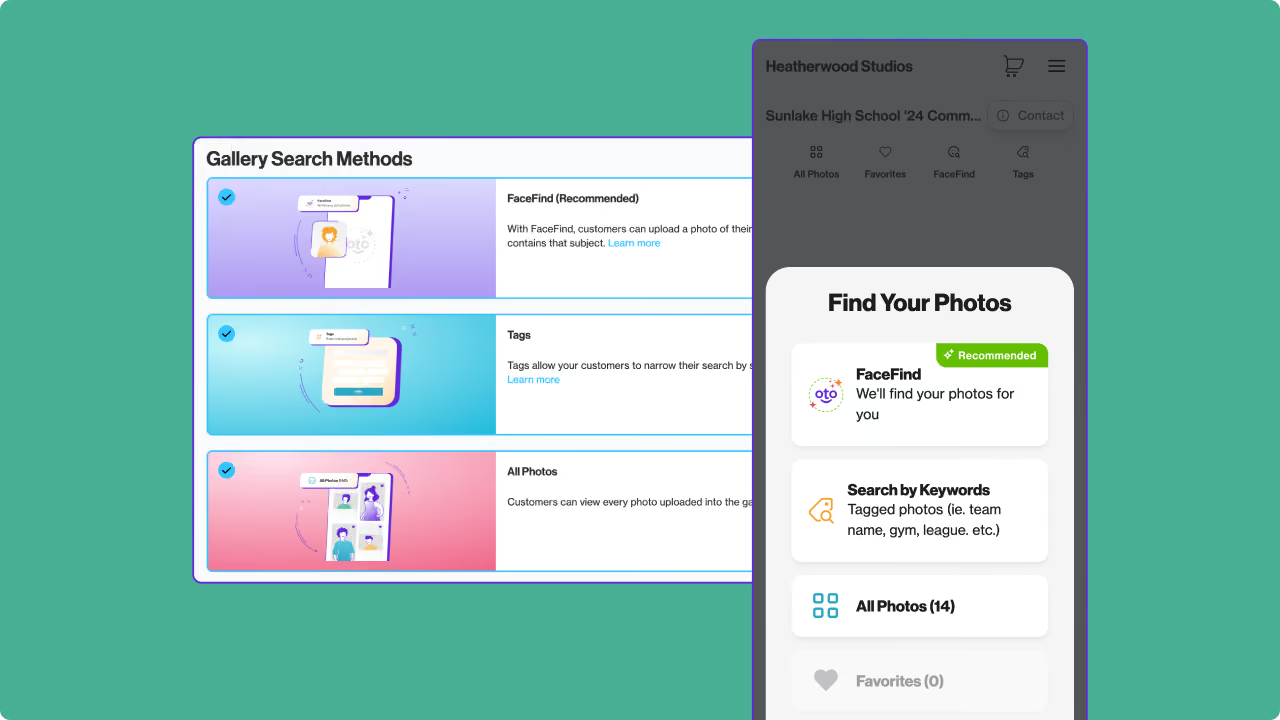
Public galleries are the strongest setup for most commencements. They're easier to share, simpler to access, and they support three search paths:
- FaceFind - Families upload a photo of the graduate, and FaceFind works its magic to show every image where that face appears: crossing the stage, candids, background appearances. For most buyers, this is the fastest path to the right photos.
- Tags - Organize images into sections like "crossing the stage," "candids," and "portraits." Helpful for families who want to browse beyond FaceFind, and useful when face coverage isn't consistent throughout the event.
- All photos - Shows the entire gallery.
For large commencements, consider disabling "all photos." Scrolling through thousands of images is frustrating, and it naturally pushes families toward the search tools that actually work. If you do keep it enabled, customers can select "find similar" from any selected image to find more photos of the same person.
For schools that require private galleries, Gallery Lookup minimizes the need for an access code. Families enter a student's name and at least one additional identifying field, and they're taken directly to the right gallery. You share one link publicly, and PhotoDay handles the rest.

Reusing subject data saves time. If you photographed senior portraits or yearbook headshots earlier in the year, you can export that data and reuse it as reference photos for commencement subject data. This reduces the need to check in every graduate at the event, and when customers are recognized and linked to subject data, the gallery can auto-filter for them.
Pricing: Downloads, Urgency, and Early Buyers
Commencement purchases tend to cluster around wallets, digital downloads, and specialty graduation items, such as tassel frames, thank-you cards, and similar products.
A few things worth knowing:
Download All has limitations in open gallery types. In public and group galleries, Download All works per face, which means every subject needs at least one photo where they appear alone. Stage-crossing images with other graduates in frame won't qualify. A portrait taken individually after the graduate exits the stage (or in a location without other people in the background) is the cleanest solution. In private galleries, Download All ties to the individual’s access code instead, so you don’t have to worry about this.
AdvancePay is worth adding. It works as a credit that customers apply toward their order, not a pre-sold package. Pair it with an incentive like free shipping or a percentage discount on a minimum spend, and it will encourage early sales. Customers who buy AdvancePay spend an average of 27% more than those who don't.
Create urgency after publishing. Free shipping for the first two weeks, a 48-hour social sharing download, a flash sale when energy starts to fade—these kinds of promotions extend the purchasing window without relying on repeated direct outreach. A practical approach: duplicate your price sheet and flip it after a deadline has passed.
Event Day Coverage: What to Prioritize
Before entering the venue, confirm batteries are charged, cards have capacity, and your team knows their positions and responsibilities.
On arrival, get physical marketing materials up immediately near entrances. A quick team meeting to confirm coverage zones and timing sets everyone up.
Coverage priorities:
- Crossing the stage: the moment most families are waiting for
- Receiving the diploma: a second, often more composed beat
- A posed portrait after the graduate exits the stage: diploma in hand, facing the camera. This is especially valuable for Download All setups and gives families a clean portrait option. It takes extra staffing to execute well at scale, but it's worth it!
- Candids throughout: entrances, reactions during speeches, graduates finding their families in the stands
- Post-ceremony family moments: hugs, photos with grandparents, friends reuniting, gifts. These images matter a lot to families and are easy to overlook when you're already thinking about packing up.
Stay 30 minutes longer than you think you need to. The post-ceremony candids are often among the most-purchased images in the gallery.
Turnaround: Fast Is the Strategy
Emotional purchasing peaks in the first few days after the event. The longer families wait to see photos, the more that energy fades.
Speed matters more than perfection here.
Cull aggressively, not selectively. Remove unusable images: completely dark frames, missed focus images, and shots that can't be saved. Don't spend too much time removing near-duplicates or choosing between two similar frames. Publish the large set and let families decide what they want.
Use AI editing tools to quickly achieve consistent color and exposure. The goal isn't a detailed edit on every image—it's getting the gallery online while cap-and-gown photos are still showing up on Instagram. PhotoDay's color correction service is only $0.10 per image. A free black-and-white post-processing option is also available!

Shoot in 4:5 when you can. This crop minimizes issues when customers order common print sizes. With a 2:3 crop, products like 8x10 can cut off heads or feet, and many customers won't manually adjust the crop, no matter how many times they’re prompted. If 2:3 is your workflow, be sure to leave extra space at the top and bottom to protect against unwanted cropping.

Protect Your Work
We know screenshot concerns are on the rise. PhotoDay's image protection settings give you options.
Auto Blur detects desktop screenshot attempts and automatically blurs the gallery. Additionally, Info Overlay places the customer's name, email, and phone number directly on the image, which helps discourage sharing. Additional mobile screenshot protections are in development.
The best part? All of these theft deterrent features are completely free and require no manual setup.
Support When You Need It
Commencement season is busy and fast-paced. If questions come up, PhotoDay's live chat is staffed by real people, and our average response time is under five minutes. We also have numerous resources, including step-by-step articles, video walkthroughs, and webinars.
The PhotoDay community is extremely active on Facebook. Join the group to connect with fellow photographers and learn useful tips and approaches from others working through similar situations.
The Short Version
Commencements run well when a solid foundation is in place: an early job setup, marketing that drives opt-ins, a gallery that makes photos easy to find, and a fast turnaround while families are still celebrating.
The photography is the part you already know how to do. This is the system that makes sure it converts.